Mavic 3 Pro: 7 Features That Redefine Aerial Photography
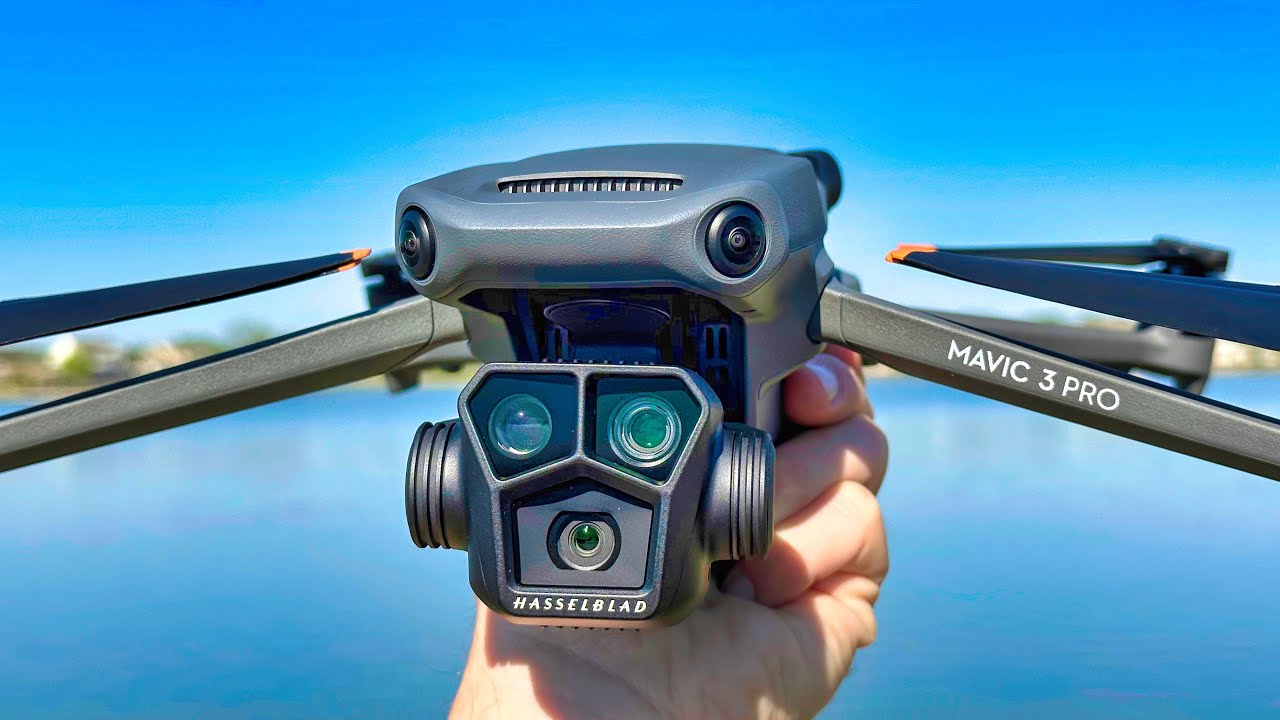
Mavic 3 Pro: A Comprehensive Overview
As the latest flagship drone from DJI, the Mavic 3 Pro elevates aerial photography and videography to new heights. 🚀 With its advanced features and superior camera capabilities, this drone is designed for both professionals and enthusiasts alike. But what makes the Mavic 3 Pro stand out in a crowded market? Let’s explore its features, benefits, and complementary tools that enhance its functionality.
Key Features of Mavic 3 Pro
The Mavic 3 Pro boasts numerous impressive features that cater to a wide range of users:
- Dual Camera System: Equipped with a 4/3 CMOS Hasselblad camera and a telephoto lens, it captures stunning 48MP stills and 5.1K video at 50fps.
- Long Flight Time: With a maximum flight time of up to 43 minutes, it allows for extended shooting sessions without constant battery changes.
- OcuSync 3.0 Technology: This advanced transmission system ensures a dependable link between the drone and the controller, even at distances exceeding 15km.
- Advanced Obstacle Avoidance: With 360-degree sensing, the Mavic 3 Pro enhances flying safety, especially in cluttered environments.
- Intelligent Modes: Features like FocusTrack, Mastershots, and Quickshots provide creative shooting options for stunning results effortlessly.
Ease of Use and Performance
One of the standout qualities of the Mavic 3 Pro is its user-friendly design. From beginners to professionals, anyone can easily navigate its features. The intuitive DJI Fly App facilitates smooth control and quick access to various settings.
**Compared to other models**, like the Mavic Air 2, the Mavic 3 Pro’s dual-camera system and longer battery life are significant advantages. Users can achieve professional results without requiring extensive training or experience. This accessibility makes it a preferred choice in the drone community.


Comparative Analysis: Mavic 3 Pro vs. Competitors
When comparing the Mavic 3 Pro to similar drones such as the Autel Evo Lite+, it’s evident that DJI remains at the forefront. While the Evo Lite+ has a competitive price and impressive specs, the Mavic 3 Pro’s extensive features offer a more comprehensive solution for serious creators.
- Camera Quality: The Mavic 3 Pro’s Hasselblad technology allows for superior color accuracy and dynamic range, which is essential for high-level photography.
- Flight Time: The Mavic 3 Pro offers a more extended flight time, making it practical for larger projects that require a longer shooting span.
- Software Integration: The Mavic 3 Pro’s compatibility with various editing software streamlines post-production workflows, crucial for professionals.
- Smart Features: The multitude of intelligent flight modes sets it apart and enhances creativity in content creation.
Complementary Tools for Mavic 3 Pro
To maximize your experience with the Mavic 3 Pro, integrating complementary tools can enhance its capabilities. Here are ten effective ideas for using additional tools alongside your drone:
- Adobe Premiere Pro: Edit high-resolution videos with advanced features, allowing for cinematic-style edits.
- DJI Terra: Combine aerial imagery with mapping solutions for land surveys and 3D modeling.
- Lume Cube Lighting: Improve lighting conditions for nighttime shoots or low-light scenarios.
- PolarPro Filters: Use ND filters to control light and capture stunning footage in bright conditions.
- SkyPixel Community: Share your work and gain inspiration from a community dedicated to aerial photography.
- DroneDeploy: Perfect for mapping and survey applications, enabling smoother workflows for professionals.
- Gimbals: Use handheld gimbals for ground shots that complement drone footage.
- DJI Smart Controller: Provides a better flying experience with a built-in display for real-time monitoring.
- Live Streaming Services: Combine drone footage with streaming capabilities for events or real-time content creation.
- SketchUp: Enhance 3D modeling processes by using aerial views for more accurate designs.
Highlight on DJI Terra
- Mapping Precision: Generate high-quality maps using captured aerial data for surveying and construction.
- 3D Modeling: Create detailed 3D representations of landscapes for architectural and environmental planning.
- Data Analysis: Utilize advanced tools for data analysis, improving decision-making processes.
- Integration Capability: Seamlessly combines with the Mavic 3 Pro to ensure efficient data capture and use.
Highlight on DJI Smart Controller
- Built-in Display: Enjoy a high-brightness display for enhanced visibility even in direct sunlight.
- Longer Range: Extend your drone’s operational range with advanced transmission technology.
- User-Friendly Interface: Access apps and settings quickly, optimizing your flying experience.
- All-in-One Solution: No need for a separate mobile device, streamlining your gear setup.
Maximizing Mavic 3 Pro for Various Applications
The Mavic 3 Pro is versatile, making it suitable for diverse applications in different industries. Here are some examples:
- Real Estate Photography: By using the Mavic 3 Pro, agents can capture breathtaking property views, enhancing listing appeal.
- Aerial Surveying: Coupled with DroneDeploy, it offers accurate mapping for land management and agriculture.
- Event Coverage: Using the Mavic 3 Pro alongside live streaming services allows for dynamic event coverage, attracting larger audiences.
- Filmmaking: Creative filmmakers can implement the dual-camera feature to create multidimensional shots.
By integrating Mavic 3 Pro with Adobe Premiere Pro, editing becomes more efficient, enabling seamless workflows that can never be overlooked. And let’s not forget the adaptability in various business fields, allowing entrepreneurs to leverage aerial imagery for enhanced marketing strategies.
Conclusion: Elevate Your Aerial Experience
In summary, the Mavic 3 Pro not only stands out for its impressive features and ease of use but also excels when complemented with the right tools and services. Whether you are shooting breathtaking landscapes or capturing important events, the possibilities are endless when you harness the full potential of this remarkable drone. With the integration of software and hardware solutions like Adobe Premiere Pro or DJI Terra, your aerial photography and videography will surely reach new heights!
Explore more about the Mavic 3 Pro and discover why it is the go-to choice for anyone serious about aerial content creation.
Key Features of the Mavic 3 Pro
When it comes to aerial photography and videography, the Mavic 3 Pro is a game-changer. With its impressive capabilities and high-end specifications, it delivers exceptional performance suited for both enthusiasts and professionals alike. Here are some of the standout features:
- Dual Camera System: The Mavic 3 Pro is equipped with a powerful dual-camera system that includes a 4/3 Hasselblad camera for stunning color accuracy and detail, paired with a telephoto camera, providing versatile shooting options.
- Extended Flight Time: Thanks to its advanced battery technology, the Mavic 3 Pro boasts a flight time of up to 46 minutes, allowing users to capture more footage in a single flight.
- Obstacle Sensing: Advanced multiple-direction obstacle sensing ensures that the drone can navigate complex environments safely, making it easier to fly in challenging locations.
- OcuSync 3.0: With OcuSync 3.0 technology, the Mavic 3 Pro offers a reliable transmission range of up to 15 kilometers, maintaining a stable connection even at great distances.
How to Maximize Your Use of Mavic 3 Pro
Using the Mavic 3 Pro effectively often involves integrating other tools and services to enhance your results. Here are some ideas on how to combine the Mavic 3 Pro with complementary tools:
1. Video Editing Software
Utilize software like Adobe Premiere Pro to edit your footage. You can enhance video quality, apply effects, and edit down your clips to create stunning final products that leverage the fantastic footage captured by the Mavic 3 Pro.
2. Photo Editing Apps
Combining your Mavic 3 Pro with Adobe Photoshop allows you to refine your aerial photographs. This tool offers advanced editing options such as:
- Layer-based editing: Allows for precise edits without losing original data.
- Vibrancy adjustments: Enhance colors to make your images stand out.
- Object removal: Easily eliminate unwanted elements from the frame.
- Sharpening tools: Increase the clarity of your images significantly.
3. Mobile Applications for Planning Flights
Make the most of your Mavic 3 Pro by using mobile apps like AirMap for flight planning and regulatory compliance. These applications can help you:
- Understand no-fly zones in your area.
- Plan optimal routes for your flights.
- Check weather conditions before flying.
- Log flight data to track your drone usage.
4. Drone Accessories
Enhance the usability of the Mavic 3 Pro by incorporating high-quality accessories such as filters or landing pads. Filters can help control exposure and reflections, while landing pads ensure safe landings on various surfaces.
5. 3D Mapping Software
Leverage the advanced imaging capability of the Mavic 3 Pro with programs like Pix4D for creating detailed 3D maps. This can enhance your projects by providing precise models for urban planning or construction:
- Detailed output: Generate high-resolution 3D models from aerial imagery.
- Analysis tools: This software provides tools for assessing terrain and height variations.
- Seamless integration: Easily integrate with CAD software for professional applications.
- Customizable outputs: Tailor outputs to meet specific project needs.
6. Cloud Storage Solutions
Using cloud storage like Dropbox can streamline your workflow. You can store and share footage captured with your Mavic 3 Pro effortlessly, ensuring that your files are safe and accessible anywhere.
7. Online Tutorials and Communities
Joining forums or platforms like DJI Education can help you learn more about the Mavic 3 Pro. These communities offer invaluable resources where you can connect with experts and peers to share tips, techniques, and troubleshooting advice.
8. High-Quality Monitors
Using a good monitor like the Dell UltraSharp U2720Q can significantly improve your editing experience. Benefits include:
- Accurate color representation: Helps ensure your edits convey the intended colors captured by your drone.
- Increased screen real estate: Convenient for editing multiple windows at once.
- 4K resolution: Allows for a clear and detailed view of your footage.
- Ergonomic design: Ensures comfortable extended use while editing.
9. Online Storage and Backup Systems
For seamless backup solutions, consider using websites like Google Drive to securely back up footage captured by the Mavic 3 Pro. This guarantees that your work is stored safely and can be easily accessed from different devices.
10. Social Media Platforms
To share your amazing aerial shots, leverage platforms like Instagram or YouTube. These platforms provide excellent visibility and engagement opportunities. Creating captivating posts with your Mavic 3 Pro footage can attract a significant audience.
Conclusion: Unlocking Potential with Mavic 3 Pro
The Mavic 3 Pro is more than just a drone; it’s an invaluable tool for anyone interested in aerial photography and videography. By enhancing its use with complementary tools such as video editing software and 3D mapping applications, you can significantly elevate the quality of your projects. Explore how these integrations can help you maximize the benefits of your Mavic 3 Pro and unlock a world of creativity.
Mavic 3 Pro: Unleashing Creativity from the Skies ✈️
The Mavic 3 Pro is not just a drone; it’s a game-changer in the world of aerial photography and videography. If you’ve ever wondered how high-end professionals capture breathtaking images and videos, look no further than this remarkable piece of technology. But what makes the Mavic 3 Pro stand out in a crowded market? Let’s dive deep into its features and explore how it can elevate your creative projects.
Key Features of the Mavic 3 Pro
The Mavic 3 Pro is packed with numerous features that enhance the user experience:
- High-Quality Camera: Equipped with a Hasselblad L2D-20c camera, it offers a 4/3 CMOS sensor that captures stunning 20 MP stills and 5.1K video at 50 FPS.
- Extended Flight Time: Enjoy up to 46 minutes of flight time on a single charge, giving you ample time to capture the perfect shot.
- Advanced Obstacle Avoidance: With omnidirectional obstacle sensing, the Mavic 3 Pro ensures safe navigation, making it user-friendly for both beginners and experienced pilots.
- Intelligent Features: Utilize features like FocusTrack, Mastershots, and Quickshots for effortless aerial storytelling.
Performance and Usability
When it comes to performance, the Mavic 3 Pro truly excels. Thanks to its powerful propulsion system and aerodynamic design, it displays remarkable stability even in challenging conditions. With the Fly More Combo package, users enjoy extra batteries and accessories that enhance usability and extend creative opportunities during shoots.
For those wondering about ease of use, the robust DJI Fly app offers intuitive controls and intelligent flight features, making it accessible for novices while also providing advanced tools for seasoned pilots.
Comparative Advantages
Compared to other high-end drones such as the Autel EVO Lite+, the Mavic 3 Pro presents a superior camera system and better flight times. Unlike the Autel EVO Lite+, the Mavic 3 Pro excels in its user-friendly interface through the DJI Fly app, making it more appealing for drone enthusiasts of all skill levels.
Complementary Tools to Enhance Your Mavic 3 Pro Experience
Integrating the right tools with the Mavic 3 Pro ensures that you unlock its full potential. Here are some effective ways to combine its capabilities with complementary tools:
1. Lume Cube Lighting
Utilize Lume Cube lights for improving low-light photography. This portable lighting solution can enhance your drone shots during twilight and nighttime operations.
2. ND Filters
ND (Neutral Density) filters help manage exposure in bright conditions, allowing for smoother video captures. These filters can help you achieve cinematic shots by controlling shutter speed.
- Improves video quality by reducing glare.
- Aids in managing exposure for bright environments.
- Helps achieve a cinematic look with smooth motion blur.
- Easy to attach and remove, making it user-friendly.
3. DJI Smart Controller
The DJI Smart Controller provides a seamless experience with its built-in display, eliminating the need for a separate mobile device. This enhances visibility under sunlight and improves flight control.
4. Adobe Premiere Pro
Editing software like Adobe Premiere Pro allows users to refine their aerial footage and create stunning edits, further adding professionalism to video projects.
5. DJI Care Refresh
Protect your investment with DJI Care Refresh, which offers a replacement service to cover accidents, giving you peace of mind while flying.
6. Mavic 3 Pro Accessories
Consider purchasing additional accessories designed specifically for the Mavic 3 Pro, such as extra batteries and propellers. These can significantly enhance your shooting sessions.
7. SkyPixel Community
Join the SkyPixel community for a vast repository of aerial photography inspiration and tips from fellow drone enthusiasts worldwide.
8. Drone Deploy
Utilize Drone Deploy for mapping and 3D modeling. This software enhances the utility of the Mavic 3 Pro by allowing you to utilize its imagery for advanced analysis.
- Streamlined flight planning optimized for mapping purposes.
- Real-time data processing for immediate insights.
- Customizable mapping solutions for various applications.
- User-friendly interface that simplifies complex tasks.
9. External Microphones
For filmmakers, pairing the Mavic 3 Pro with an external microphone enhances audio quality, providing a more immersive experience in videos.
10. Landing Pads
Use landing pads for a safe takeoff and landing area, especially in uneven terrains, protecting the drone from dirt and grass.
Real-World Applications of Mavic 3 Pro
The versatility of the Mavic 3 Pro extends across various sectors:
- Real Estate: Capture stunning aerial views of properties, enhancing listings and attracting prospective buyers.
- Event Filming: Use the drone to document weddings or events from unique angles, adding cinematic quality to your work.
- Travel and Landscape Photography: Discover breathtaking landscapes and capture the beauty of nature with ease.
- Agriculture: Monitor crop health and assess land conditions efficiently, aiding in decision-making processes.
Learning and Community Support
For users looking to enhance their skills with the Mavic 3 Pro, numerous resources are available online, including tutorial videos and forums dedicated to drone piloting. Engaging with the community can also open up opportunities for collaboration and learning from experienced drone pilots.
Final Thoughts
The Mavic 3 Pro emerges as a standout choice for both amateurs and professionals seeking to take their aerial photography and videography to the next level. Coupled with complementary tools and resources, its capabilities expand, demonstrating the versatility and potential of this advanced drone. Whether you’re aiming for stunning landscapes or intricate mapping applications, the Mavic 3 Pro is designed to deliver excellence in every flight.
Mavic 3 Pro: Unleashing Creativity in Aerial Photography 🚁
Are you ready to elevate your photography skills? The Mavic 3 Pro showcases cutting-edge technology and advanced features that redefine aerial photography. From its stunning camera capabilities to its impressive flight performance, this drone is crafted to help you capture breathtaking imagery like never before. But that’s not all; let’s dive into how the Mavic 3 Pro can be further enhanced using complementary tools and services.
Key Features of Mavic 3 Pro
The Mavic 3 Pro incorporates several innovations that make it a standout choice for both professionals and enthusiasts. Here are some of its core features:
- Camera System: Equipped with a dual-camera setup, the Mavic 3 Pro offers a 4/3 CMOS sensor with 20MP resolution and a telephoto lens with 12MP capabilities, enabling diverse shooting scenarios.
- Extended Flight Time: With a maximum flight time of up to 46 minutes, you can create longer, uninterrupted shots.
- Advanced Obstacle Sensing: The omnidirectional obstacle sensing system ensures safety while flying, making it easier for users to focus on their shots.
- Smart Features: Features like FocusTrack, QuickShots, and Mastershots automate complex filming tasks, ideal for capturing cinematic footage.
Comparative Analysis with Previous Models
Compared to older models like the Mavic Air 2 or Mavic 2 Pro, the Mavic 3 Pro offers substantial improvements:
- Camera Quality: The larger sensor and dual-camera system provide superior image and video quality, particularly in low-light conditions.
- Flight Time: With nearly a 30% increase in flight time over the Mavic 2 Pro, users can shoot more without frequent battery changes.
- Flight Performance: Enhanced stability and responsiveness in winds make the Mavic 3 Pro better suited for challenging environments.
Complementary Tools to Enhance Your Mavic 3 Pro Experience
Knowing how to use your Mavic 3 Pro is only part of the journey. Enhancing it with complementary tools can elevate your overall experience significantly. Here are some ideas to consider:
1. DJI Fly App
The DJI Fly App is the primary application for operating the Mavic 3 Pro. It enhances your flying experience through:
- Real-time telemetry and map overlays for situational awareness.
- Seamless content sharing capabilities post-flight.
- Access to tutorials and user guides for maximizing the drone’s capabilities.
2. ND Filters
Using ND filters enhances your camera’s performance under various lighting conditions. These filters, available from manufacturers like Freewell, allow for:
- Better control over exposure in bright settings.
- Smoother video motion for cinematic qualities.
- Creative flexibility by allowing lower shutter speeds.
- Enhanced color richness and detail in captured images.
3. Landing Pad
A reliable landing pad protects your drone and offers a stable launching surface. Ideal options include portable landing pads to ensure safety during takeoff and landing.
4. Portable Power Bank
Carry a portable power bank specifically designed for drone batteries to ensure you always have enough power while on the go.
5. First-Person View (FPV) Goggles
FPV goggles enhance the flying experience by offering a unique perspective. Connecting them to your Mavic 3 Pro allows for immersive flying, making it perfect for racing enthusiasts.
6. Drone Carrying Case
A sturdy carrying case is essential for safely transporting your Mavic 3 Pro and its accessories, protecting them from damage during transit.
7. Cloud Storage Solutions
Utilizing cloud storage solutions like Dropbox or Google Drive allows for backing up and sharing large video files easily.
8. Image Editing Software
Post-processing images captured by your Mavic 3 Pro will refine your aerial shots. Software like Adobe Photoshop can significantly enhance your results through:
- Advanced editing capabilities that allow for precise adjustments in color and detail.
- Seamless integration with Lightroom for further photo enhancement.
- Compatibility with various file formats from the Mavic 3 Pro.
- Ability to create composites and composite images.
9. Tripod for Ground Photography
For users looking to combine aerial photography with ground shots, a sturdy tripod is essential for stable images when the Mavic 3 Pro is not in the air.
10. Collaboration with Videographers
Partnering with videographers to create more extensive projects can open up new opportunities and maximize the creative use of your Mavic 3 Pro’s capabilities.
Best Practices for Flying Mavic 3 Pro
To effectively utilize your Mavic 3 Pro, consider these best practices:
- Always fly within line-of-sight to maintain control.
- Check local regulations regarding drone flying in your area.
- Practice operating in open areas to become familiar with controls.
- Regularly check and update your firmware via the DJI Fly App.
Conclusion
Incorporating the Mavic 3 Pro into your photography and videography endeavors can vastly enhance your creative output. The impressive features paired with the right complementary tools—notably the DJI Fly App, ND filters, and reliable cloud storage solutions—enable you to capture stunning visuals and streamline your workflows. By leveraging these resources, you’ll not only maximize your Mavic 3 Pro but also elevate your projects to new heights.
